Go to Frequently Asked Questions for UBPR, Call Report, or Public Accounts
UBPR FAQs:
o What is the Uniform Bank Performance Report (UBPR)?
o Who is the target audience for the UBPR?
o Is there a User's Guide for the UBPR?
o How do I access the UBPR or ESR Interactive User's Guide?
o Why can't I see the UBPR report which I selected from the Reports menu?
o What is the source of UBPR data?
o What kinds of data appear in the UBPR?
o Is a UBPR computed for all banks?
o Is a UBPR computed for holding companies?
o What is the earliest UBPR data that is available?
o I can't find the UBPR for my bank.
o My bank may have merged - how can I find the successor bank?
o Where is the regulatory or supervisory rating for a bank?
o Is bulk UBPR data or data for all banks available as a dataset?
o Why did UBPR data change from the last time a UBPR was printed?
o What impact does a merger have on UBPR data?
o How frequently is UBPR data updated?
o When will UBPR data for the most recent quarter become available?
o How are Peer Groups defined?
o Why did UBPR Peer Group data change from the last time a UBPR was printed?
o Why was my bank assigned to another peer group?
o Why does peer group average data not add up?
o How is a specific ratio computed?
o What is the tax equivalent adjustment and how is it computed?
o I am having trouble computing a yield, rate or other earnings related ratio.
o Where are the regulatory capital ratios used by banking supervisors?
o What impact does a merger have on UBPR data?
o How Many Reports that Use UBPR Data are Available?
o List of Banks in Peer Group Report
o Peer Group Average Distribution Report
o State Average Distribution Report
o Custom Peer Group Bank Report
- What is the Uniform Bank Performance Report? The UBPR is a multi-page financial analysis of a commercial bank or savings bank that files the Consolidated Reports of Condition and Income (Call Report). The UBPR is organized by subject, e.g., earnings, balance sheet, asset quality, liquidity, and capital. Each report contains data for five separate periods of time derived from data reported in the quarterly Call Report filed by banks. Refer to the table of contents at the front of the UBPR for an individual bank for more information. The UBPR compares the performance of a given bank both against itself over time and against the performance of a group of peer banks. Peer group average and percentile ranking data provide benchmarks to measure bank performance. A UBPR may be viewed online, printed, or exported to a delimited file for further use in Excel. Additionally, the UBPR may be exported to an eXtensible Business Reporting Language (XBRL) file for use in XBRL enabled tools.
- Who is the target audience for the UBPR? The principal target audience for the UBPR is federal and state banking supervisors and the banks they supervise. To fully use the information contained in the UBPR, users should be familiar with the Reports of Condition and Income (Call Report) and have an understanding of financial analysis.
- Is there a User's Guide for the UBPR? Yes, the UBPR User's Guide is available in PDF format on the Public Data Distribution (PDD) website at this link: UBPR User's Guide. Additionally, while viewing the UBPR online, the calculation methodology for a UBPR ratio is accessible in the UBPR Interactive User's Guide by clicking on the UBPR ratio name in a UBPR for an individual institution.
-
How do I access the UBPR or ESR Interactive User's Guide?
An interactive user's guide is available when viewing a Uniform Bank Performance Report (UBPR) or Executive Summary Report (ESR) report online. The interactive user's guide enables users to drill-down through the formulas for more information on how the UBPR line items are derived.
To access the UBPR Interactive Online User's Guide:
- Access https://cdr.ffiec.gov/public/ManageFacsimiles.aspx
- Select Uniform Bank Performance Report (UBPR) (or Executive Summary Report) from the Reports drop-down list.
- Enter a unique identifier and click Generate, or enter some search criteria and select the bank name link the search results list.
- Select the desired report format information, then click the Generate Report button. The report opens in a new window.
- Select the desired UBPR page.
- Select the line item name link. The Interactive User's Guide display in a new window, and displays the line item's concept name, description, formula and other information. Concepts referenced in the formula are listed on the left.
- Click any of the concepts on the left to drill through to that concept to see its information.
- Access https://cdr.ffiec.gov/public/ManageFacsimiles.aspx
- Why can't I see the UBPR report which I selected from the Reports menu? Some of the UBPR reports from the CDR public website display in a new browser window. However, when the user selects one of these reports, pop-up blocker software may prevent the report from displaying. Changing your browser to allow UBPR reports to appear within the CDR public website should resolve this issue. Since there are different kinds of pop-up blockers, please visit the respective pop-up vendor websites to get more information on how to configure your browser.
- What is the source of UBPR data? Virtually all of the dollar values, ratios, peer group averages and percentile rankings within the UBPR are computed from financial data reported on the quarterly Call Report. A minor amount of structural or non-financial data comes from the banking agencies, including the number of branches and Metropolitan Statistical Area (MSA) codes used in UBPR ratios and peer group analysis.
- What kinds of data appear in the UBPR? There are five principal types of financial data contained in the UBPR.
1. Dollar data for individual banks appears on most pages and is derived from the Call Report and the Summary of Deposits. All dollar data is displayed in thousands, consistent with the standard used in the Call Report. Income and expense data that appears in the UBPR is generally year-to-date; however, quarterly income information is available on Page 2A and Page 12. Balance sheet data displayed in the UBPR is usually a spot or end-of-period value.
2. Ratio data appears on many pages. Some ratios are quite complex and involve several levels of computation. Ratios are displayed in percent format to two decimals of precision.
3. Peer group average data is computed for many ratios. An average of a given ratio for all banks within the peer group is presented as a benchmark.
4. Percentile rankings are computed for most ratios contained in the UBPR. It is a value from 0 to 99 and reflects the percentile or percentage position of a given bank relative to other peer banks for a specific ratio.
5. Some structural or demographic information is displayed, including identifying information such as RSSD ID number, Certificate Number, street address and holding company information.
- Is a UBPR computed for all banks? The UBPR is computed for all institutions that file a Call Report. Due to data incompatibility, the UBPR was previously not computed for savings banks supervised by the Office of Thrift Supervision (OTS). However, with the implementation of the Dodd Frank Act and sunset of the OTS on July 21, 2011, all thrifts are required to submit Call Reports instead of Thrift Financial Reports effective March 2012, and UBPRs are available for these institutions beginning at that time.
- Is a UBPR computed for holding companies? No. The Board of Governors of the Federal Reserve provides a similar report called the Bank Holding Company Performance Report for holding companies. That report is computed from data reported by bank holding companies and is available through the National Information Center link on www.ffiec.gov or at https://www.ffiec.gov/NPW
- What is the earliest UBPR data that is available? The earliest UBPR data available in the CDR is December 2002. If a bank converted from an OTS savings to a commercial bank charter, then UBPR data is available from the date of the conversion forward, and available for all thrifts from March 2012 forward.
- I can't find the UBPR for my bank. Because the UBPR is computed only for FDIC insured institutions that file a Call Report. UBPRs are not generated for institutions that have been acquired by or merged into another financial institution. The FDIC website (BankFind Suite: Find Institutions by Name & Location) can be useful in determining why a UBPR is not generated for a specific financial institution.
- My bank may have merged - how can I find the successor bank? Use the FDIC website (BankFind Suite: Find Institutions by Name & Location) to retrieve the history of a given bank and select the successor bank.
- Where is the regulatory or supervisory rating for a bank? The UBPR does not present the supervisory rating of a bank because that information is confidential.
- Is bulk UBPR data or data for all banks available as a dataset? The CDR Public Data Distribution (PDD) site (https://cdr.ffiec.gov/public/) provides bulk UBPR data in delimited and XBRL datasets at no charge.
- Why did UBPR data change from the last time a UBPR was printed? UBPR data is refreshed at least weekly to reflect changes in the underlying Call Report data filed by banks. This is the most common reason for bank level UBPR data to change. Additionally, the formulas that are used to compute UBPR data may have changed, so please see the UBPR website at www.ffiec.gov for recent changes in UBPR formulas.
- What impact does a merger have on UBPR data? A significant merger is defined as one that results in asset growth of 25% or greater. When a significant merger occurs, all earnings and profitability ratios are adjusted to exclude balances prior to the merger date from any averages.
- How frequently is UBPR data updated? UBPR data for the most recent quarter is updated daily and for the five most recent consecutive quarters once a week. This schedule allows amendments to Call Report data in prior quarters to be reflected in the UBPR within a week or less. Typically, the UBPR data is refreshed for all quarters at least annually.
- When will UBPR data for the most recent quarter become available? UBPR data for an individual bank is computed shortly after the Call Report is received and is generally made available to the public the next day. UBPR data is made available once the underlying Call Report data has passed validation at the CDR. If the Call Report has been filed and the UBPR data is missing, bankers should contact their assigned CDR Call Report analyst to resolve any outstanding Call Report questions.
- When will UBPR Peer Group data for the most recent quarter become available? To ensure validity, peer group average and percentile ranking data found in the individual bank UBPR will be published after most banks assigned to a specific peer group have filed their Call Reports. Peer Group data generally is published 30 to 35 days after quarter end. Note Peer Group Average, Peer Group Average Distribution, State Average, and State Average Distribution reports generally are made available 45 days after quarter end.
Banks are placed into one of six broad categories defined by line of business. Specific peer groups are also defined within many of those six broad categories. See the online Users Guide at UBPR User's Guide for additional details.
1. Commercial Banks - banks not in one of the subsequent specialty peer groups are considered commercial banks. These peer groups are defined by a combination of asset size, number of branches and location in a Metropolitan Statistical Area. Most banks fall within this grouping.
2. Savings Banks - FDIC insured and supervised savings banks are in one of four peer groups defined by asset size within this special line of business category.
3. Credit Card Specialty Banks - Insured commercial banks whose lending activities are focused on credit cards are in one of three peer groups within this special line of business peer group.
4. De Novo Banks - Newly chartered insured commercial banks are placed into a peer group defined by the year of opening. Banks remain in the de novo peer group for 5 years after which they are moved to another peer group.
5. Bankers Banks - Insured commercial banks that are chartered as banker's banks are placed in a single special line of business peer group.
6. Fiduciary Banks - Banks chartered to carry on the trust business typically have minimal loan and deposit activity.
- Why did UBPR Peer Group data change from the last time a UBPR was printed? UBPR data is processed nightly to derive peer group averages and percentile rankings, which is the most common reason for change. Additionally, the formulas that are used to compute UBPR data may have changed. Finally, peer group definitions themselves may have changed, although this is the least frequent cause for peer group data to change.
- Why was my bank assigned to another peer group? There can be many reasons for a bank to change peer groups. Compare the old and new peer groups as defined in the UBPR Users Guide at UBPR User's Guide and determine which component changed. Many times commercial banks will change peer group because of asset growth, addition of new branches or a county-based Metropolitan Statistical Area (MSA) code redefinition. The Federal Reserve Board is the source for structural information about the bank, including the number of branches and MSA codes. If you have questions about the branch count or MSA data used in the UBPR please contact your local Federal Reserve Bank.
- What are trust peer groups? Trust peer groups are a supplemental set of 5 peer groups defined by the volume of fiduciary business. Membership in a trust peer group is independent of membership in one of the other broad peer groups used in the remainder of the UBPR. See the online Users Guide at UBPR User's Guide for details.
- Why does peer group average data not add up? The average for a ratio is the trimmed average of the ratios for the banks within the peer group. However, the population of banks included in the average for each ratio is trimmed to eliminate outliers above the 95th and below the 5th percentile. Because different banks may be trimmed from different ratios it is not possible for a column of averaged ratios to add up.
- What is the PCT column? Data under the PCT column represents the percentile ranking or percentage position of a bank relative to others within the peer group for a specific ratio. Thus, if a bank is at the 75th percentile, then 75% of the banks have a value for that number that is lower while 25% have a number that is higher.
- What is the PG column? The number in the PG column identifies which peer group a given bank was assigned to. Data under the PG column represents the average of a ratio for banks within a specific peer group. Note that values for the banks are simply summed and divided by the number of banks after the population of banks included in the average for each ratio is trimmed to eliminate outliers above the 95th and below the 5th percentile.
- How is a specific ratio computed? Refer to the online UBPR Users Guide at UBPR User's Guide for details.
- What is the tax equivalent adjustment and how is it computed? The tax equivalent adjustment is designed to gross up tax exempt income to an equivalent amount if it were taxable. The UBPR system uses the following pieces of data from the Call Report to estimate the tax benefit: Tax exempt income, interest expense to carry tax exempt securities and pre-tax net operating income. The amount of tax benefit is determined using federal income tax tables and is limited by the lesser of amount of estimated taxable income or tax exempt income. The UBPR Users Guide on UBPR User's Guide has a multi-page worksheet for re-computing the tax benefit.
Earnings related ratios are all computed in the following manner: Income or Expense is first annualized then divided by an average of the asset or liability. The following rules apply:
1. Income or expense is annualized by multiplying by 4, 2, 1.33 or 1 depending on the quarter (first, second, third or fourth).
2. If the bank is a de novo bank in the first year of operations or reports a pushdown transaction, then the annualization is adjusted to count the actual number of days. The revised annualization factor is: 365 (366) / number of days.
3. The average asset or liability is always based on a year-to-date average and uses the best average possible. Thus, if the data is in the Call Report Schedule RC-K, that data is used. Otherwise, spot balances from other schedules are averaged.
4. If the bank was involved in a significant merger (asset growth > 25%), then only assets or liabilities from the date of the merger forward are used.
- Where are the regulatory capital ratios used by banking supervisors? Regulatory capital ratios can be found on the Capital Analysis pages of the UBPR or in the bank's Call Report Schedule RC-R.
- What impact does a merger have on UBPR data? A significant merger is defined as one that results in asset growth of 25% or greater. When a significant merger occurs, all earnings and profitability ratios are adjusted to exclude balances prior to the merger date from any averages.
There are nine reports:
- Executive Summary Report - The report introduced in December 2019 is intended for Bank Executives and Board Members to easily see the trend of an institution's key ratios.
- List of Banks in Peer Group Report - The report provides a list of all banks within a given peer group. The report can be used for several purposes including identification of other local or regional banks for further comparison and possible inclusion in a Custom Peer report. The report displays several useful fields including FDIC Certificate Number, name, location and basic financial data.
- Peer Group Average Report - The peer group average report provides peer group average data in UBPR report format for all peer groups. Because this report displays industry-wide statistics for a variety of peer groups it may be used to perform macro analysis of banking performance. Various reports include several high-level slices of UBPR data including all banks, all commercial banks and all savings banks. Performance of various peer groups may be compared. Bankers may use this report to get an advanced look at a peer group in which their bank may be classified.
- Peer Group Average Distribution Report - The peer group average distribution report provides a view of the range of values that underlie peer group average data. The report is organized in UBPR report format for all peer groups. However, data is presented for only one quarter. The values of selected percentiles from 0 to 99 present the distribution of values that make up the peer group average that is displayed to the far right. This report is particularly useful for bankers and bank supervisors who want to get behind the averages and have a better sense for how widely bank performance can vary.
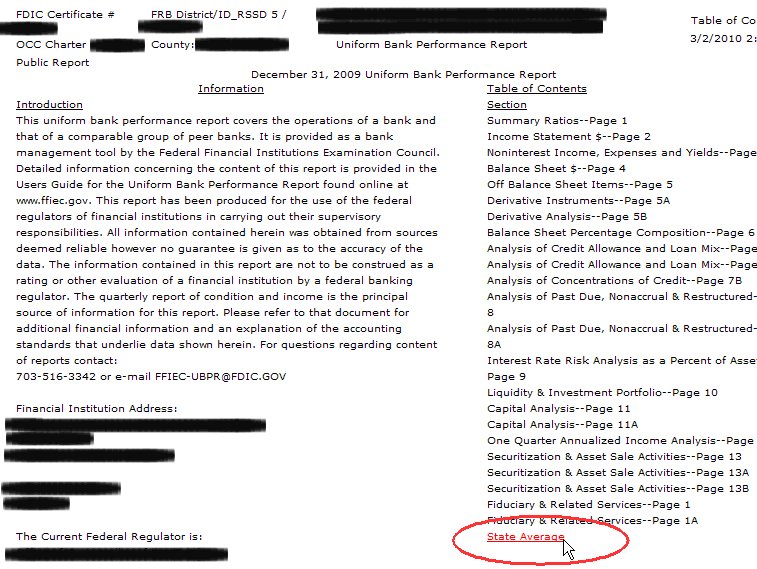
- State Average Report - The state average report provides UBPR data averaged for each state in UBPR report format. Only selected UBPR ratios are presented on a single page for each state. Note that a separate report is generated for each class of peer group (e.g., commercial banks, savings banks, credit card specialty banks, etc.). This data provides another view of banking industry performance on a state-wide rather than national basis. Average performance of banks within various state groups may be compared. State Average Reports are available within the UBPR Report facsimile page. To generate the State Average Report, click the State Average link located within the Table of Contents on the right column of the cover page (see image below).
- State Average Distribution Report - The state average distribution report provides a view of the range of values that underlie state average data. The report is organized in UBPR report format for all states. However, data is presented for only one quarter. The values of selected percentiles from 0 to 99 present the distribution of values that make up the state average. The resulting average for each ratio is also displayed to the far right. This report is particularly useful for bankers and bank supervisors who want to get behind the averages and have a better sense of how widely bank performance can vary.
- Custom Peer Group Bank Report - The custom peer report allows a UBPR to be computed for any bank that includes peer group statistics based on a user-defined peer group of banks. This report would be useful for bankers and bank supervisors who would like to supplement standard peer group statistics with data based on a more narrowly defined group of banks. Examples could include banks within an MSA or banks within a state that are subchapter S banks, etc. A built-in search engine allows banks to be identified by a variety of criteria including location, asset size, subchapter S status, etc. Note that because of system resource limitations, a maximum of 2000 banks may be included in a custom peer group.
- Bank XBRL Instance Document - This report contains bank and peer membership data for one financial institution in the eXtensible Business Reporting Language (XBRL). It may include one to eight periods of data for a single financial institution.
Call Report FAQs:
1. What type of information is available on this site?
For an overview, see About the FFIEC CDR Public Data Distribution website and its data.
2. How can I obtain further help with use of this site?
Please contact the Help Desk for additional assistance.
3. How can I download an individual schedule (or a few schedules) of a Call Report?
From the Welcome Page, two options are available:
A. Under the section "View or download data for individual institutions", the user must select "Call" as the report type and then enter a search criteria to specify the institution for which you want one or more schedules. Download the entire Call Report using one of the three available options at the top of the screen. Once downloaded, select and copy the schedules you want into a new document or, alternatively, delete the schedules you do not want from your downloaded document.
B. Under the section "Download bulk data", you can download into a single tab-delimited file all of the Balance Sheet, Income Statement, and Past Due items for all reporters for a calendar year (four periods of data). Once data is downloaded, delete unwanted columns.
4. Why are data values that are usually expressed as percentages presented as decimal fractions?
Percentage values are collected in decimal fraction format and are being displayed that way.
5. On the Search page, what is a Unique Identifier?
Each banking regulatory agency assigns a special identifying number to a federally insured institution. The identifiers are the Federal Reserve's ID RSSD, the FDIC's certificate number, and the OCC's charter number. The American Bankers Association also assigns a unique identifier, the ABA routing number. An identifier type is selected from the drop-down list and then the corresponding number is entered in the text box below. Using a unique identifier enables you to retrieve data for an institution quickly and reduces the possibility of the institution not being found because a name was entered incorrectly.
Previously, facsimile reports were provided as HTML pages. HTML pages are viewed on the screen without regard to the number of lines per page; this meant that page breaks for printing had to be controlled manually so that only 88 lines of text would print on a page. This worked fine as long as you didn't change the size of the font while viewing it on the screen. If you changed the size of the font using the browser's View menu and then printed the page, the page would still break after the 88th line regardless of where that actually appeared.
The new facsimiles are presented in Portable Document Format (PDF) where the page you view on the screen is very similar to the printed page. In a PDF browser, you can enlarge the viewing area temporarily to improve readability without affecting how the page is printed.
7. How can I obtain Call Report data for periods prior to 2001?
The banking agencies do not retain individual reports prior to March 2001. For inquiries prior to 2001, we direct inquirers to the FDIC's Institution Directory where balance sheet, income statement and some supplementary financial data are available. Historical data may also be available through the U.S. Department of Commerce National Technical Information Service.
8. Where are the Call Report Instructions and blank forms located?
You can access instructions and forms at http://www.fdic.gov/regulations/resources/call/index.html.
Both are also available at http://www.ffiec.gov/forms031.htm , http://www.ffiec.gov/forms041.htm and http://www.ffiec.gov/forms051.htm.
9. How do I search for the Bank of the Federated States of Micronesia ?
You can search using either the ID RSSD (718275) or the FDIC Cert (26539).
10. In the bulk data download files, why are some of the data fields "blank"?
Two scenarios might cause a field to be blank:
A. The fields may be blank because the data item is not publicly available. Contact information, and several items on the Call Reports are confidential, and therefore they are not available to the public. In the Call Reports, Schedule RI-E, item 2.g, "FDIC deposit insurance assessments", for report dates beginning June 30, 2009; Schedule RC-F, item 6.f, "Prepaid deposit insurance assessments", for report dates beginning December 31, 2009, Schedule RC-T, Fiduciary and Related Services, on the components of fiduciary and related services income (but not "Total gross fiduciary and related services income") and on fiduciary settlements, surcharges, and losses (Memorandum, item 4), on an individual bank basis for report dates prior to March 31, 2009; and Schedule RC-N, Past Due and Nonaccrual Loans, Leases, and Other Assets, in column A, "Past due 30 through 89 days and still accruing" and in all of Memorandum, item 1, "Restructured loans and leases included in Schedule RC-N above", on an individual bank basis for report dates prior to March 31, 2001, will not be publicly disclosed. See instructions and forms for additional details.
B. A blank may also appear when an item is not required to be reported by an institution. The form for banks with foreign offices (FFIEC 031) has more detail than the report forms for banks with domestic offices only (FFIEC 041 and FFIEC 051). For more information, refer to the General Instructions section "Differences in Detail of Reports" in the Reports of Condition and Income Instruction Books .
11. How can I print the full text of this FAQ page and other pages without the text being truncated on the printed page?
Move the cursor over any of the text on the page you wish to print, right click, then choose "Print..." (not Print Preview).
12. What is the FFIEC 051 Form?
The FFIEC 051 is a streamlined version of the existing Consolidated Reports of Condition and Income for a Bank with Domestic Offices Only (FFIEC 041), which was created by (1) removing certain existing schedules and data items and replacing them with a limited number of data items in a new supplemental schedule, (2) eliminating certain other existing data items, and (3) reducing the reporting frequency of certain data items. The FFIEC 051 is generally available to institutions with domestic offices only and assets of less than $1 billion.
Public Account FAQs:
1. What's the difference between Public User account and PWS account?
PDD Public user accounts allow you to save a list of favorite banks and custom peer groups for use while viewing UBPR Reports on the CDR PDD website. You can also save UBPR line items to a custom MyUBPR page, for quick reference while viewing a UBPR. The CDR PDD Public Web Services (PWS) accounts enable users to programmatically retrieve Call Report and UBPR data. For more information, see https://cdr.ffiec.gov/public/PWS/PWSPage.aspx.
2. What happens if I forgot my Username?
If you have forgotten your user name, contact the CDR Help Desk for assistance.
3. How do I reset my password?
CDR PDD Public and PWS accounts are accessed by entering your user name and then authenticating using your email and identity provider (IDP) credentials (password and multifactor challenge, if multifactor authentication (MFA) is enable). If you have forgotten or need assistance resetting your password, contact your IDP.
4. What is an identity provider (IDP)?
An identity provider (IDP) manages and verifies user identities, allowing them to access various applications, services and resources. For example, your organization's IDP may act as a central authentication authority, allowing you to log in once and access various resources in your organization, such as your organization's intranet or applications. An IDP may also provide authentication to third-party service providers (websites, applications, or other services). For instance, you might use your Google credentials when you log into YouTube and Spotify. In this case, Google is managing and authenticating your identity, allowing you to access YouTube and Spotify without creating separate usernames and passwords.
5. My account is deactivated. How do I reactive it?
Accounts will be deactivated if they are not used for an extended period. Call the CDR Help Desk for assistance reactivating your account. See Contact CDR Help Desk for Help Desk hours. If your account remains inactive for too long, the Help Desk may not be able to reactivate it, and you will need to create a new account.
6. Why can't I turn off multifactor authentication (MFA)?
CDR PDD Public and PWS users may choose to log in with Password Only or Multifactor Authentication (MFA). However, if you have multiple CDR user accounts associated with your email, and any one of them use MFA, then all your accounts will be required to use MFA to log in.
7. I have a new email. How do I update my account?
Emails cannot be changed. You'll need to request a new account using your new email address.